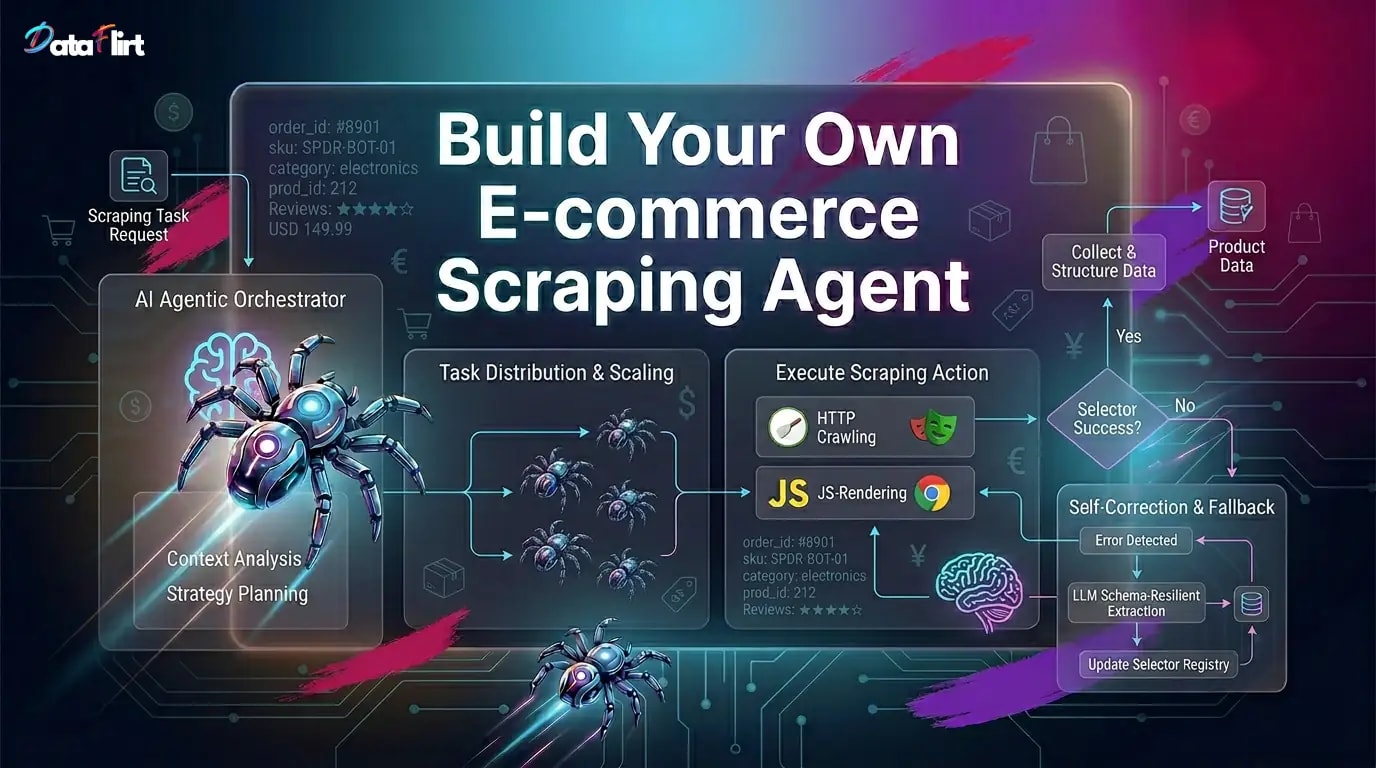

Building an e-commerce scraping agent — an autonomous system that reasons about what to scrape, adapts when sites change, coordinates multiple specialized workers, and plugs into your existing data stack without a complete architectural rewrite?
This guide delivers exactly that – a production-grade eCom agent from day one: observable, horizontally scalable, crash-resilient, and LLM-augmented without being LLM-dependent for every request. By the end, you will have built a complete e-commerce scraping agent stack spanning five layers:
- An MCP (Model Context Protocol) tool server that exposes your scraping primitives — page rendering, CSS extraction, CAPTCHA detection, proxy rotation — as typed, callable tools any LLM agent can invoke.
- A CLI interface for direct operator control — launching agents, inspecting state, replaying failed tasks — without touching the codebase.
- A single-agent reasoning loop that uses Gemini 2.5 or Claude Sonnet to decide how to scrape a given URL, handle failures, and structure output.
- A multi-agent scraping pipeline with an orchestrator agent and a pool of specialized sub-agents — catalogue crawlers, product detail extractors, price delta monitors — coordinated over Redis Streams.
- Production deployment patterns — Kubernetes CronJobs, Prometheus metrics, structured logging, and dead-letter queue handling that make your e-commerce scraping agent operationally durable.
The e-commerce data market drives this investment. The global e-commerce analytics market was valued at approximately $6.2 billion in 2024 and is projected to grow at a CAGR exceeding 23% through 2030, almost entirely fueled by real-time competitive intelligence — price monitoring, product availability tracking, and assortment gap analysis. Every major retailer already runs an e-commerce scraping agent or buys the output from one. Your pipeline is the infrastructure that produces this intelligence.
Scope note: All tools used in this guide are open-source. Where scraping infrastructure services are referenced (proxy networks, managed scraping APIs), they are described functionally without vendor specificity. All code is Python (primary) and JavaScript/TypeScript (secondary). LLM code covers Google GenAI SDK (Gemini 2.5), Vertex AI, and Anthropic SDK (Claude Opus and Sonnet).
Architecture Blueprint: The Five-Layer E-commerce Scraping Agent Stack
Before writing a single line of code, understand the architecture you are building. An e-commerce scraping agent is not a monolith — it is a layered system where each layer has a distinct responsibility and a clean interface to the layers above and below it.
┌─────────────────────────────────────────────────────────────────────┐
│                    ORCHESTRATOR AGENT (Layer 4)                     │
│         LLM reasoning loop — Claude Sonnet / Gemini 2.5             │
│         Task decomposition, worker routing, failure recovery         │
└───────────────────────────┬─────────────────────────────────────────┘
                            │ Redis Streams (task bus)
          ┌─────────────────┼──────────────────────┐
          ▼                 ▼                       ▼
┌─────────────────┐ ┌──────────────────┐ ┌──────────────────────────┐
│ Catalogue Agent │ │  Detail Extractor│ │  Price Monitor Agent     │
│  (HTTP tier)    │ │  (Browser tier)  │ │  (Differential agent)    │
│  Scrapy/httpx   │ │  Playwright +    │ │  LLM data extraction     │
│  URL frontier   │ │  LLM fallback    │ │  + alerting hooks        │
└────────┬────────┘ └──────┬───────────┘ └────────────┬─────────────┘
         │                 │                           │
         └─────────────────┴─────────────────────────┘
                            │
                   ┌────────▼────────┐
                   │  MCP Tool Server│  ← Layer 1
                   │  (scrape_page,  │
                   │  extract_data,  │
                   │  rotate_proxy,  │
                   │  detect_captcha)│
                   └────────┬────────┘
                            │
                   ┌────────▼────────┐
                   │   Data Store    │
                   │  PostgreSQL +   │
                   │  Redis cache    │
                   └─────────────────┘
This architecture enables three properties that distinguish a production e-commerce scraping agent from a script:
Composability: Each layer exposes a typed interface. The orchestrator agent calls MCP tools the same way it would call a REST API — it does not know or care whether the tool uses Playwright or Scrapy internally. Swap the underlying implementation without changing the agent.
Observability: Each layer emits structured logs and Prometheus metrics. You can identify exactly which sub-agent failed, on which URL, using which proxy, with what error, in real time.
Adaptability: When a target site changes its HTML structure, the e-commerce scraping agent’s reasoning loop detects the extraction failure, routes the HTML through the LLM data extraction path, and if a new stable selector can be inferred, updates the selector registry without human intervention.
Prerequisites and Virtual Environment Setup
Every code block in this guide runs inside an isolated virtual environment. This is not optional hygiene — it is a hard requirement for reproducible agent deployments.
# Python 3.11+ required — agent frameworks use modern typing syntax
python3.11 -m venv .ecom-agent-env
source .ecom-agent-env/bin/activate    # Windows: .ecom-agent-env\Scripts\activate

# Verify activation
python --version   # Should report 3.11.x or higher

# Core dependencies for the e-commerce scraping agent stack
pip install \
  mcp \
  anthropic \
  google-genai \
  google-cloud-aiplatform \
  playwright \
  scrapy \
  scrapy-playwright \
  httpx \
  redis \
  celery \
  click \
  typer \
  pydantic \
  selectolax \
  prometheus-client \
  structlog \
  tenacity \
  python-dotenv \
  asyncio-throttle

# Install Playwright browser binaries
playwright install chromium firefox

# Node.js dependencies (for TypeScript MCP server variant)
npm install -g tsx
npm install @modelcontextprotocol/sdk playwright axios cheerio zod
Create your project structure before proceeding:
mkdir -p ecom-scraping-agent/{
  mcp_server,
  agents/{orchestrator,catalogue,detail,monitor},
  cli,
  config,
  storage,
  tests,
  deploy/{kubernetes,docker}
}
touch ecom-scraping-agent/.env
Your .env file:
# LLM API Keys
ANTHROPIC_API_KEY=your_anthropic_key
GOOGLE_API_KEY=your_google_genai_key
GOOGLE_CLOUD_PROJECT=your_gcp_project
GOOGLE_CLOUD_LOCATION=us-central1

# Redis (task bus for multi-agent scraping pipeline)
REDIS_URL=redis://localhost:6379

# Database
DATABASE_URL=postgresql://postgres:password@localhost:5432/ecom_agent

# Proxy configuration (residential proxy provider endpoint)
PROXY_ENDPOINT=http://proxy.example.com:8080
PROXY_USERNAME=your_user
PROXY_PASSWORD=your_pass

# Agent configuration
MAX_CONCURRENT_BROWSERS=5
REQUEST_DELAY_MIN=1.0
REQUEST_DELAY_MAX=4.0
LLM_EXTRACTION_FALLBACK_THRESHOLD=0.10
Layer 1: The MCP Tool Server — Exposing Scraping Primitives to Agents
The Model Context Protocol (MCP) is the foundational architectural decision in building a modern e-commerce scraping agent. Introduced by Anthropic and adopted as an open standard, MCP defines a structured protocol for exposing tools, resources, and prompts to LLM runtimes. It is to agent tooling what REST is to HTTP APIs — a standard interface contract that decouples implementation from consumption.
For an e-commerce scraping agent, MCP means your scraping primitives — page rendering, DOM extraction, proxy rotation, CAPTCHA detection, pagination traversal — are defined once in the MCP server and callable by any MCP-compatible agent runtime: Claude Desktop, a custom agent loop, a Cursor plugin, or a headless CI pipeline.
Why MCP Over Direct Function Calls?
Without MCP, each agent implementation hard-codes tool calls specific to its runtime. With MCP, tool definitions are schema-validated, versioned, and portable. An orchestrator agent for agentic web scraping that calls scrape_page via MCP does not need to be rewritten when you swap the underlying Playwright implementation for a cloud-based rendering service. The tool contract stays stable.
Building the MCP Tool Server in Python
# Install MCP SDK (already in venv from prerequisites)
# pip install mcp  ← already done
# mcp_server/server.py
"""
MCP Tool Server for the E-commerce Scraping Agent Stack.
Exposes scraping primitives as typed MCP tools callable by any
MCP-compatible LLM runtime. This server is the foundational layer
of the multi-agent scraping pipeline.
Run with: python mcp_server/server.py
"""
import asyncio
import json
import os
import random
import time
from typing import Any
from urllib.parse import urlparse, urljoin
import httpx
from mcp.server import Server
from mcp.server.stdio import stdio_server
from mcp.types import (
Tool,
TextContent,
ImageContent,
EmbeddedResource,
)
from playwright.async_api import async_playwright, BrowserContext, Page
from selectolax.parser import HTMLParser
from pydantic import BaseModel
from dotenv import load_dotenv
load_dotenv()
# ── Server Instantiation ──────────────────────────────────────────────────────
server = Server("ecommerce-scraping-agent")
# ── Global Browser Pool ───────────────────────────────────────────────────────
_browser = None
_playwright_instance = None
MAX_CONTEXTS = int(os.getenv("MAX_CONCURRENT_BROWSERS", "5"))
_semaphore = asyncio.Semaphore(MAX_CONTEXTS)
async def get_browser():
"""Lazy-initialise Playwright browser. Shared across MCP tool calls."""
global _browser, _playwright_instance
if _browser is None:
_playwright_instance = await async_playwright().start()
_browser = await _playwright_instance.chromium.launch(
headless=True,
args=[
"--disable-blink-features=AutomationControlled",
"--no-sandbox",
"--disable-dev-shm-usage",
],
)
return _browser
async def create_stealth_context(browser) -> BrowserContext:
"""Create a fingerprint-hardened browser context for the e-commerce scraping agent."""
proxy_config = None
proxy_endpoint = os.getenv("PROXY_ENDPOINT")
if proxy_endpoint:
parsed = urlparse(proxy_endpoint)
proxy_config = {
"server": f"{parsed.scheme}://{parsed.hostname}:{parsed.port}",
"username": os.getenv("PROXY_USERNAME", ""),
"password": os.getenv("PROXY_PASSWORD", ""),
}
viewport_w = random.choice([1280, 1366, 1440, 1536, 1920])
viewport_h = random.choice([768, 800, 864, 900, 1080])
context = await browser.new_context(
viewport={"width": viewport_w, "height": viewport_h},
user_agent=(
"Mozilla/5.0 (Windows NT 10.0; Win64; x64) "
"AppleWebKit/537.36 (KHTML, like Gecko) "
"Chrome/124.0.0.0 Safari/537.36"
),
locale="en-US",
timezone_id="America/New_York",
proxy=proxy_config,
extra_http_headers={
"Accept-Language": "en-US,en;q=0.9",
"Sec-Ch-Ua": '"Chromium";v="124", "Google Chrome";v="124", "Not-A.Brand";v="99"',
"Sec-Ch-Ua-Mobile": "?0",
"Sec-Ch-Ua-Platform": '"Windows"',
},
)
# Block non-essential resources to reduce bandwidth
await context.route(
"**/*.{png,jpg,jpeg,gif,svg,ico,woff,woff2,mp4,webm}",
lambda route: route.abort(),
)
return context
# ── MCP Tool Definitions ──────────────────────────────────────────────────────
@server.list_tools()
async def list_tools() -> list[Tool]:
"""
Declare all tools available to the e-commerce scraping agent.
Each tool is schema-validated — the LLM agent receives typed input/output contracts.
"""
return [
Tool(
name="scrape_page",
description=(
"Renders a URL using a stealth headless browser and returns the full DOM HTML. "
"Use for JavaScript-rendered e-commerce product pages where static HTTP fails. "
"Returns HTML content and a CAPTCHA detection flag."
),
inputSchema={
"type": "object",
"properties": {
"url": {"type": "string", "description": "Target URL to render"},
"wait_selector": {
"type": "string",
"description": "CSS selector to wait for before returning HTML",
"default": "body",
},
"timeout_ms": {
"type": "integer",
"description": "Max wait time in milliseconds",
"default": 30000,
},
},
"required": ["url"],
},
),
Tool(
name="extract_fields",
description=(
"Extracts structured fields from HTML using CSS selectors. "
"Returns a JSON object with extracted field values. "
"Use after scrape_page when selectors are known and stable."
),
inputSchema={
"type": "object",
"properties": {
"html": {"type": "string", "description": "Raw HTML content"},
"selectors": {
"type": "object",
"description": "Map of field_name to CSS selector string",
"additionalProperties": {"type": "string"},
},
},
"required": ["html", "selectors"],
},
),
Tool(
name="extract_product_links",
description=(
"Extracts all product/listing URLs from a catalogue or category page HTML. "
"Applies configurable link pattern filtering."
),
inputSchema={
"type": "object",
"properties": {
"html": {"type": "string", "description": "Catalogue page HTML"},
"base_url": {"type": "string", "description": "Base URL for resolving relative links"},
"link_pattern": {
"type": "string",
"description": "Substring that valid product URLs must contain",
"default": "/product",
},
"max_links": {"type": "integer", "default": 100},
},
"required": ["html", "base_url"],
},
),
Tool(
name="detect_captcha",
description=(
"Checks HTML content for known CAPTCHA fingerprints. "
"Returns a detection result with CAPTCHA type if found."
),
inputSchema={
"type": "object",
"properties": {
"html": {"type": "string"},
"url": {"type": "string"},
},
"required": ["html"],
},
),
Tool(
name="fetch_static",
description=(
"Performs a lightweight HTTP GET with spoofed TLS fingerprint. "
"Use for static HTML pages that do not require JavaScript execution. "
"Significantly faster than scrape_page for non-JS targets."
),
inputSchema={
"type": "object",
"properties": {
"url": {"type": "string"},
"headers": {
"type": "object",
"additionalProperties": {"type": "string"},
},
},
"required": ["url"],
},
),
Tool(
name="paginate_catalogue",
description=(
"Follows pagination links on a catalogue page and aggregates product URLs "
"across all pages up to max_pages. "
"Handles both URL-parameter and next-link pagination patterns."
),
inputSchema={
"type": "object",
"properties": {
"start_url": {"type": "string"},
"pagination_selector": {
"type": "string",
"description": "CSS selector for the 'next page' link",
},
"max_pages": {"type": "integer", "default": 10},
"link_pattern": {"type": "string", "default": "/product"},
},
"required": ["start_url"],
},
),
]
# ── MCP Tool Implementations ──────────────────────────────────────────────────
@server.call_tool()
async def call_tool(name: str, arguments: dict[str, Any]) -> list[TextContent | ImageContent | EmbeddedResource]:
"""Route MCP tool calls to their implementations."""
if name == "scrape_page":
return await _scrape_page(**arguments)
elif name == "extract_fields":
return await _extract_fields(**arguments)
elif name == "extract_product_links":
return await _extract_product_links(**arguments)
elif name == "detect_captcha":
return await _detect_captcha(**arguments)
elif name == "fetch_static":
return await _fetch_static(**arguments)
elif name == "paginate_catalogue":
return await _paginate_catalogue(**arguments)
else:
return [TextContent(type="text", text=json.dumps({"error": f"Unknown tool: {name}"}))]
async def _scrape_page(
url: str,
wait_selector: str = "body",
timeout_ms: int = 30_000,
) -> list[TextContent]:
"""
Render a URL using stealth headless Chromium.
The e-commerce scraping agent calls this for JavaScript-dependent pages.
"""
async with _semaphore: # Bound browser concurrency
browser = await get_browser()
context = await create_stealth_context(browser)
page = await context.new_page()
try:
await page.goto(url, wait_until="domcontentloaded", timeout=timeout_ms)
if wait_selector != "body":
try:
await page.wait_for_selector(wait_selector, timeout=10_000)
except Exception:
pass # Proceed with whatever DOM is available
# Simulate human scroll to trigger lazy-loaded content
await page.evaluate("window.scrollBy(0, document.body.scrollHeight / 2)")
await asyncio.sleep(random.uniform(0.8, 1.8))
html = await page.content()
captcha_flag = _check_captcha_markers(html, url)
result = {
"url": page.url,
"html": html,
"html_length": len(html),
"captcha_detected": captcha_flag,
"status": "success",
}
return [TextContent(type="text", text=json.dumps(result))]
except Exception as e:
return [TextContent(type="text", text=json.dumps({
"url": url,
"error": str(e),
"status": "error",
"captcha_detected": False,
}))]
finally:
await context.close()
async def _extract_fields(html: str, selectors: dict[str, str]) -> list[TextContent]:
"""
CSS selector-based field extraction using selectolax (C-extension, ~10x faster than BS4).
Core LLM data extraction fallback path activates when this returns empty fields.
"""
parser = HTMLParser(html)
extracted = {}
failed_fields = []
for field_name, selector in selectors.items():
try:
node = parser.css_first(selector)
if node:
# Prefer text content; fall back to attribute values
value = node.text(strip=True)
if not value:
value = node.attributes.get("content", "") or node.attributes.get("value", "")
extracted[field_name] = value
else:
extracted[field_name] = None
failed_fields.append(field_name)
except Exception as e:
extracted[field_name] = None
failed_fields.append(field_name)
result = {
"extracted": extracted,
"failed_fields": failed_fields,
"success_rate": (len(selectors) - len(failed_fields)) / max(len(selectors), 1),
"llm_fallback_recommended": len(failed_fields) / max(len(selectors), 1) > 0.10,
}
return [TextContent(type="text", text=json.dumps(result))]
async def _extract_product_links(
html: str,
base_url: str,
link_pattern: str = "/product",
max_links: int = 100,
) -> list[TextContent]:
"""Extract and deduplicate product URLs from a catalogue page."""
parser = HTMLParser(html)
links = set()
for anchor in parser.css("a[href]"):
href = anchor.attributes.get("href", "")
if not href or href.startswith(("javascript:", "mailto:", "#")):
continue
full_url = urljoin(base_url, href)
if link_pattern in full_url:
links.add(full_url)
if len(links) >= max_links:
break
result = {
"product_urls": sorted(links),
"count": len(links),
"base_url": base_url,
"pattern_used": link_pattern,
}
return [TextContent(type="text", text=json.dumps(result))]
async def _detect_captcha(html: str, url: str = "") -> list[TextContent]:
"""Identify CAPTCHA presence and type in scraped HTML."""
captcha_signatures = {
"cloudflare": ["cf-browser-verification", "cf_clearance", "ray-id", "__cf_bm"],
"recaptcha": ["g-recaptcha", "recaptcha/api.js", "grecaptcha"],
"hcaptcha": ["hcaptcha.com", "h-captcha"],
"access_denied": ["access denied", "403 forbidden", "unusual traffic", "sorry/index"],
"datadome": ["datadome.co", "dd_cookie_test"],
}
html_lower = html.lower()
detected = {}
for captcha_type, markers in captcha_signatures.items():
if any(m in html_lower for m in markers):
detected[captcha_type] = True
return [TextContent(type="text", text=json.dumps({
"captcha_detected": bool(detected),
"captcha_types": list(detected.keys()),
"url": url,
"recommended_action": "rotate_proxy_and_retry" if detected else "proceed",
}))]
async def _fetch_static(url: str, headers: dict | None = None) -> list[TextContent]:
"""
Lightweight HTTP fetch with hardened headers.
Use for the HTTP tier of the multi-agent scraping pipeline (no JS needed).
"""
default_headers = {
"User-Agent": (
"Mozilla/5.0 (Windows NT 10.0; Win64; x64) AppleWebKit/537.36 "
"(KHTML, like Gecko) Chrome/124.0.0.0 Safari/537.36"
),
"Accept": "text/html,application/xhtml+xml,application/xml;q=0.9,*/*;q=0.8",
"Accept-Language": "en-US,en;q=0.9",
"Accept-Encoding": "gzip, deflate, br",
"Connection": "keep-alive",
}
if headers:
default_headers.update(headers)
proxy = os.getenv("PROXY_ENDPOINT")
proxies = {"http://": proxy, "https://": proxy} if proxy else None
try:
async with httpx.AsyncClient(
headers=default_headers,
proxies=proxies,
follow_redirects=True,
timeout=20.0,
) as client:
response = await client.get(url)
response.raise_for_status()
return [TextContent(type="text", text=json.dumps({
"url": str(response.url),
"html": response.text,
"status_code": response.status_code,
"html_length": len(response.text),
"captcha_detected": False,
"status": "success",
}))]
except Exception as e:
return [TextContent(type="text", text=json.dumps({
"url": url,
"error": str(e),
"status": "error",
}))]
async def _paginate_catalogue(
start_url: str,
pagination_selector: str = "a[rel='next'], a.next-page, a.pagination-next",
max_pages: int = 10,
link_pattern: str = "/product",
) -> list[TextContent]:
"""
Traverse paginated catalogue pages and aggregate all product URLs.
This tool supports the catalogue sub-agent in the multi-agent scraping pipeline.
"""
all_product_urls = set()
current_url = start_url
pages_visited = 0
browser = await get_browser()
while current_url and pages_visited < max_pages:
context = await create_stealth_context(browser)
page: Page = await context.new_page()
try:
await page.goto(current_url, wait_until="domcontentloaded", timeout=30_000)
await asyncio.sleep(random.uniform(1.0, 2.5))
html = await page.content()
except Exception as e:
break
finally:
await context.close()
# Extract product links from current page
parser = HTMLParser(html)
for anchor in parser.css("a[href]"):
href = anchor.attributes.get("href", "")
full_url = urljoin(current_url, href)
if link_pattern in full_url:
all_product_urls.add(full_url)
# Find next page link
next_parser = HTMLParser(html)
next_node = next_parser.css_first(pagination_selector)
if next_node:
next_href = next_node.attributes.get("href", "")
next_url = urljoin(current_url, next_href)
current_url = next_url if next_url != current_url else None
else:
current_url = None
pages_visited += 1
await asyncio.sleep(random.uniform(1.5, 3.5))
return [TextContent(type="text", text=json.dumps({
"product_urls": sorted(all_product_urls),
"count": len(all_product_urls),
"pages_visited": pages_visited,
"start_url": start_url,
}))]
def _check_captcha_markers(html: str, url: str = "") -> bool:
"""Internal helper to detect CAPTCHA fingerprints in rendered HTML."""
markers = [
"g-recaptcha", "cf-browser-verification", "hcaptcha.com",
"access denied", "unusual traffic", "datadome", "__cf_bm",
]
html_lower = html.lower()
return any(m in html_lower for m in markers)
# ── Server Entry Point ────────────────────────────────────────────────────────
async def main():
"""Start the MCP tool server for the e-commerce scraping agent."""
async with stdio_server() as (read_stream, write_stream):
await server.run(
read_stream,
write_stream,
server.create_initialization_options(),
)
if __name__ == "__main__":
asyncio.run(main())TypeScript MCP Server Variant
For teams running a Node.js-native stack, here is the equivalent MCP tool server in TypeScript. This variant is particularly useful when the multi-agent scraping pipeline feeds into a Node.js backend:
// mcp_server/server.ts
import { Server } from "@modelcontextprotocol/sdk/server/index.js";
import { StdioServerTransport } from "@modelcontextprotocol/sdk/server/stdio.js";
import {
  CallToolRequestSchema,
  ListToolsRequestSchema,
} from "@modelcontextprotocol/sdk/types.js";
import { chromium, BrowserContext } from "playwright";
import * as cheerio from "cheerio";
import { z } from "zod";

const server = new Server(
  { name: "ecommerce-scraping-agent", version: "1.0.0" },
  { capabilities: { tools: {} } }
);

let browser: Awaited<ReturnType<typeof chromium.launch>> | null = null;

async function getBrowser() {
  if (!browser) {
    browser = await chromium.launch({
      headless: true,
      args: ["--disable-blink-features=AutomationControlled", "--no-sandbox"],
    });
  }
  return browser;
}

// Tool: scrape_page
async function scrapePage(url: string, waitSelector = "body"): Promise<object> {
  const b = await getBrowser();
  const context: BrowserContext = await b.newContext({
    userAgent:
      "Mozilla/5.0 (Windows NT 10.0; Win64; x64) AppleWebKit/537.36 (KHTML, like Gecko) Chrome/124.0.0.0 Safari/537.36",
    locale: "en-US",
    viewport: { width: 1366, height: 768 },
  });

  // Block image/font resources to speed up the e-commerce scraping agent
  await context.route("**/*.{png,jpg,jpeg,gif,svg,ico,woff,woff2}", (r) =>
    r.abort()
  );

  const page = await context.newPage();
  try {
    await page.goto(url, { waitUntil: "domcontentloaded", timeout: 30_000 });
    if (waitSelector !== "body") {
      await page.waitForSelector(waitSelector, { timeout: 10_000 }).catch(() => {});
    }
    await page.evaluate(() => window.scrollBy(0, window.innerHeight));
    await page.waitForTimeout(1000 + Math.random() * 1500);
    const html = await page.content();
    const captchaDetected =
      html.includes("g-recaptcha") || html.includes("cf-browser-verification");
    return { url: page.url(), html, captchaDetected, status: "success" };
  } catch (err) {
    return { url, error: String(err), status: "error" };
  } finally {
    await context.close();
  }
}

// Tool: extract_fields
function extractFields(html: string, selectors: Record<string, string>): object {
  const $ = cheerio.load(html);
  const extracted: Record<string, string | null> = {};
  const failed: string[] = [];

  for (const [field, selector] of Object.entries(selectors)) {
    const el = $(selector).first();
    const value = el.text().trim() || el.attr("content") || el.attr("value") || null;
    extracted[field] = value;
    if (!value) failed.push(field);
  }

  return {
    extracted,
    failedFields: failed,
    successRate: (Object.keys(selectors).length - failed.length) / Math.max(Object.keys(selectors).length, 1),
    llmFallbackRecommended: failed.length / Math.max(Object.keys(selectors).length, 1) > 0.10,
  };
}

server.setRequestHandler(ListToolsRequestSchema, async () => ({
  tools: [
    {
      name: "scrape_page",
      description: "Renders a URL using stealth headless browser. Returns HTML and CAPTCHA detection flag.",
      inputSchema: {
        type: "object",
        properties: {
          url: { type: "string" },
          waitSelector: { type: "string", default: "body" },
        },
        required: ["url"],
      },
    },
    {
      name: "extract_fields",
      description: "Extract structured fields from HTML using CSS selectors.",
      inputSchema: {
        type: "object",
        properties: {
          html: { type: "string" },
          selectors: { type: "object", additionalProperties: { type: "string" } },
        },
        required: ["html", "selectors"],
      },
    },
  ],
}));

server.setRequestHandler(CallToolRequestSchema, async (request) => {
  const { name, arguments: args } = request.params;
  let result: object;

  if (name === "scrape_page") {
    result = await scrapePage(args.url as string, args.waitSelector as string);
  } else if (name === "extract_fields") {
    result = extractFields(args.html as string, args.selectors as Record<string, string>);
  } else {
    result = { error: `Unknown tool: ${name}` };
  }

  return {
    content: [{ type: "text", text: JSON.stringify(result) }],
  };
});

const transport = new StdioServerTransport();
await server.connect(transport);
Layer 2: The CLI Interface — Operator Control Without Code Changes
A production e-commerce scraping agent needs a CLI so that operators can inspect pipeline state, trigger one-off scrapes, replay failed tasks, and update configuration — without editing Python files or redeploying containers.
# cli/main.py
"""
CLI for the E-commerce Scraping Agent Stack.
Provides operator access to scraping tasks, agent state, and pipeline management.

Usage:
  python cli/main.py scrape-url "https://example.com/product/123"
  python cli/main.py run-catalogue --domain example.com --max-pages 50
  python cli/main.py inspect-queue --queue product_detail
  python cli/main.py replay-failed --since "2026-04-01"
"""

import asyncio
import json
import os
from datetime import datetime
from typing import Optional

import click
import redis
import structlog
from dotenv import load_dotenv

load_dotenv()
logger = structlog.get_logger()

redis_client = redis.from_url(os.getenv("REDIS_URL", "redis://localhost:6379"))


@click.group()
@click.version_option(version="1.0.0")
def cli():
    """E-commerce Scraping Agent — operator CLI."""
    pass


@cli.command("scrape-url")
@click.argument("url")
@click.option("--output", "-o", type=click.Choice(["json", "table"]), default="json")
@click.option("--use-browser", is_flag=True, default=False, help="Force headless browser rendering")
@click.option("--extract-selectors", "-s", multiple=True, help="field:selector pairs e.g. price:.price-box")
def scrape_url(url: str, output: str, use_browser: bool, extract_selectors: tuple):
    """
    Run the e-commerce scraping agent against a single URL and print results.
    Use --use-browser for JavaScript-rendered pages.
    """
    from agents.orchestrator.single_agent import run_single_url_agent

    selectors = {}
    for s in extract_selectors:
        if ":" in s:
            field, selector = s.split(":", 1)
            selectors[field.strip()] = selector.strip()

    click.echo(f"[CLI] Launching e-commerce scraping agent for: {url}")
    result = asyncio.run(run_single_url_agent(url, use_browser=use_browser, selectors=selectors or None))

    if output == "json":
        click.echo(json.dumps(result, indent=2))
    else:
        click.echo("\n── Scrape Result ──────────────────────────────")
        for k, v in result.items():
            if k != "html":
                click.echo(f"  {k:20s}: {v}")


@cli.command("run-catalogue")
@click.option("--domain", required=True, help="Target domain (e.g. example.com)")
@click.option("--category-url", required=True, help="Category page URL to start from")
@click.option("--max-pages", default=20, show_default=True)
@click.option("--max-products", default=500, show_default=True)
@click.option("--dry-run", is_flag=True, help="Discover URLs without running extraction")
def run_catalogue(domain: str, category_url: str, max_pages: int, max_products: int, dry_run: bool):
    """
    Launch the catalogue sub-agent to discover and queue product URLs.
    Enqueues discovered URLs into the multi-agent scraping pipeline.
    """
    from agents.catalogue.crawler import run_catalogue_agent

    click.echo(f"[CLI] Starting catalogue agent: {domain} | {category_url}")
    click.echo(f"      Max pages: {max_pages} | Max products: {max_products} | Dry run: {dry_run}")

    result = asyncio.run(
        run_catalogue_agent(
            start_url=category_url,
            domain=domain,
            max_pages=max_pages,
            max_products=max_products,
            dry_run=dry_run,
        )
    )

    click.echo(f"\n[RESULT] Discovered {result['count']} product URLs across {result['pages_visited']} pages")
    if dry_run:
        for i, url in enumerate(result["urls"][:20], 1):
            click.echo(f"  {i:3d}. {url}")
        if result["count"] > 20:
            click.echo(f"  ... and {result['count'] - 20} more")
    else:
        click.echo(f"[QUEUED] {result['queued']} URLs pushed to Redis Stream: product_detail")


@cli.command("inspect-queue")
@click.option("--queue", default="product_detail", help="Stream name to inspect")
@click.option("--limit", default=10)
def inspect_queue(queue: str, limit: int):
    """Show pending tasks in the multi-agent scraping pipeline queue."""
    try:
        # Read last N messages from Redis Stream
        messages = redis_client.xrevrange(queue, count=limit)
        pending = redis_client.xpending(queue, "agent-workers")

        click.echo(f"\n── Queue: {queue} ──────────────────────────────")
        click.echo(f"  Total messages : {redis_client.xlen(queue)}")
        click.echo(f"  Pending (PEL)  : {pending['pending']}")
        click.echo(f"\n── Last {limit} Messages ──────────────────────")
        for msg_id, data in messages:
            status = data.get(b"status", b"queued").decode()
            url = data.get(b"url", b"").decode()
            ts = data.get(b"queued_at", b"").decode()
            click.echo(f"  [{status:10s}] {url[:60]} ({ts})")
    except redis.exceptions.ResponseError as e:
        click.echo(f"[ERROR] Redis error: {e}. Is the stream '{queue}' created?")


@cli.command("replay-failed")
@click.option("--queue", default="product_detail_dlq", help="Dead-letter queue name")
@click.option("--since", help="Only replay failures after this date (YYYY-MM-DD)")
@click.option("--limit", default=100)
def replay_failed(queue: str, since: Optional[str], limit: int):
    """
    Replay tasks from the dead-letter queue back into the active multi-agent scraping pipeline.
    Use after fixing a blocking issue (CAPTCHA spike, proxy pool exhaustion, site change).
    """
    since_ts = None
    if since:
        dt = datetime.strptime(since, "%Y-%m-%d")
        since_ts = str(int(dt.timestamp() * 1000))  # Redis Stream ID timestamp

    messages = redis_client.xrange(queue, min=since_ts or "-", count=limit)
    replayed = 0

    for msg_id, data in messages:
        url = data.get(b"url", b"").decode()
        if url:
            redis_client.xadd("product_detail", {
                "url": url,
                "status": "queued",
                "queued_at": datetime.utcnow().isoformat(),
                "replayed_from": queue,
                "original_msg_id": msg_id.decode(),
            })
            replayed += 1

    click.echo(f"[REPLAY] {replayed} tasks re-queued from {queue} into product_detail")


@cli.command("agent-status")
def agent_status():
    """Show the health status of all running agents in the multi-agent scraping pipeline."""
    keys = redis_client.keys("agent:status:*")
    if not keys:
        click.echo("[WARN] No agent heartbeats found in Redis. Are agents running?")
        return

    click.echo("\n── Agent Health Status ──────────────────────────")
    for key in sorted(keys):
        data = redis_client.hgetall(key)
        agent_id = key.decode().replace("agent:status:", "")
        last_seen = data.get(b"last_seen", b"unknown").decode()
        tasks = data.get(b"tasks_completed", b"0").decode()
        errors = data.get(b"errors", b"0").decode()
        captchas = data.get(b"captchas_hit", b"0").decode()
        click.echo(f"  {agent_id:30s} | last: {last_seen} | tasks: {tasks} | errors: {errors} | captchas: {captchas}")


if __name__ == "__main__":
    cli()
Layer 3: The Single-Agent Reasoning Loop — LLM-Powered E-commerce Scraping
The single agent is where agentic web scraping takes shape. It is a reasoning loop that uses an LLM to decide which MCP tools to call, in what order, with what parameters, based on the goal of extracting structured product data from any e-commerce page — without being given the exact CSS selectors upfront.
With Claude Sonnet (Anthropic SDK)
# agents/orchestrator/single_agent.py
"""
Single-agent reasoning loop for the e-commerce scraping agent.
Uses Claude Sonnet to autonomously select and sequence MCP tools
to extract structured product data from any e-commerce URL.

The agent demonstrates agentic web scraping: it observes failure signals
(empty fields, CAPTCHA detection) and adapts its tool sequence accordingly.
"""

import asyncio
import json
import os
from typing import Any

import anthropic
import structlog
from dotenv import load_dotenv
from tenacity import retry, stop_after_attempt, wait_exponential

load_dotenv()
logger = structlog.get_logger()

# ── Anthropic Client ──────────────────────────────────────────────────────────

anthropic_client = anthropic.Anthropic(api_key=os.getenv("ANTHROPIC_API_KEY"))

# ── MCP Tool Stubs (called locally for single-agent; via MCP server in multi-agent) ──

from mcp_server.server import (
    _scrape_page,
    _extract_fields,
    _extract_product_links,
    _detect_captcha,
    _fetch_static,
)


def parse_mcp_response(response_list) -> dict:
    """Parse TextContent list returned by MCP tool functions."""
    if response_list and hasattr(response_list[0], "text"):
        return json.loads(response_list[0].text)
    return {}


# ── Tool Registry for Claude Tool Use ────────────────────────────────────────

CLAUDE_TOOLS = [
    {
        "name": "scrape_page",
        "description": (
            "Renders a URL using stealth headless browser and returns HTML. "
            "Use for JavaScript-rendered e-commerce product pages. "
            "Returns html, captcha_detected, and status."
        ),
        "input_schema": {
            "type": "object",
            "properties": {
                "url": {"type": "string"},
                "wait_selector": {"type": "string", "default": "body"},
            },
            "required": ["url"],
        },
    },
    {
        "name": "fetch_static",
        "description": "Lightweight HTTP fetch for static pages. Faster than scrape_page. Use first and fall back to scrape_page on failure.",
        "input_schema": {
            "type": "object",
            "properties": {"url": {"type": "string"}},
            "required": ["url"],
        },
    },
    {
        "name": "extract_fields",
        "description": (
            "Extract structured product fields using CSS selectors. "
            "Returns extracted values and a llm_fallback_recommended flag. "
            "Always check llm_fallback_recommended — if True, call llm_extract_product."
        ),
        "input_schema": {
            "type": "object",
            "properties": {
                "html": {"type": "string"},
                "selectors": {"type": "object", "additionalProperties": {"type": "string"}},
            },
            "required": ["html", "selectors"],
        },
    },
    {
        "name": "detect_captcha",
        "description": "Detect CAPTCHA presence in HTML. Always call this after scrape_page before proceeding.",
        "input_schema": {
            "type": "object",
            "properties": {
                "html": {"type": "string"},
                "url": {"type": "string"},
            },
            "required": ["html"],
        },
    },
    {
        "name": "llm_extract_product",
        "description": (
            "LLM data extraction fallback. Use when extract_fields returns llm_fallback_recommended=true "
            "or when less than 50% of fields were successfully extracted. "
            "Passes raw HTML to a language model for schema-free structured output."
        ),
        "input_schema": {
            "type": "object",
            "properties": {
                "html": {"type": "string"},
                "url": {"type": "string"},
            },
            "required": ["html"],
        },
    },
]

# ── Agent System Prompt ───────────────────────────────────────────────────────

AGENT_SYSTEM_PROMPT = """You are an expert e-commerce scraping agent. Your goal is to extract
structured product data from any e-commerce URL provided.

## Your Process for Agentic Web Scraping:
1. Start with fetch_static (faster, lower footprint). If it fails or returns JS-rendered content, use scrape_page.
2. Always call detect_captcha on the HTML before proceeding.
3. Attempt extract_fields with standard e-commerce CSS selectors first.
4. If extract_fields returns llm_fallback_recommended=true or success_rate < 0.5, call llm_extract_product.
5. Return the final structured product data as a JSON object.

## Standard E-commerce CSS Selectors to Try:
- name: h1, [itemprop='name'], .product-title, .product-name
- price: [itemprop='price'], .price, .product-price, .a-price-whole
- currency: [itemprop='priceCurrency'], .currency-symbol
- availability: [itemprop='availability'], .stock-status, .availability
- sku: [itemprop='sku'], [data-sku], .sku
- brand: [itemprop='brand'], .brand-name, .manufacturer
- description: [itemprop='description'], .product-description, #description
- rating: [itemprop='ratingValue'], .rating-value, .stars-value
- review_count: [itemprop='reviewCount'], .review-count

## Self-Healing Rule:
If 3+ consecutive selectors fail, switch immediately to llm_extract_product.
Do not exhaust all selectors if early failures indicate a non-standard page structure.

Always return a final JSON with: name, price, currency, availability, sku, brand, description, rating, url, extraction_method."""

# ── Tool Execution Router ─────────────────────────────────────────────────────

async def execute_tool(tool_name: str, tool_input: dict[str, Any]) -> dict:
    """
    Route Claude's tool calls to the appropriate MCP tool implementation.
    This is the bridge between the LLM reasoning loop and the scraping infrastructure.
    """
    logger.info("agent.tool_call", tool=tool_name, url=tool_input.get("url", ""))

    if tool_name == "scrape_page":
        result = await _scrape_page(**tool_input)
    elif tool_name == "fetch_static":
        result = await _fetch_static(**tool_input)
    elif tool_name == "extract_fields":
        result = await _extract_fields(**tool_input)
    elif tool_name == "detect_captcha":
        result = await _detect_captcha(**tool_input)
    elif tool_name == "llm_extract_product":
        # LLM data extraction fallback — invoke Gemini for schema-free extraction
        result = await _llm_extract_product_gemini(
            html=tool_input.get("html", ""),
            url=tool_input.get("url", ""),
        )
    else:
        result = [type("T", (), {"text": json.dumps({"error": f"Unknown tool: {tool_name}"})})()]

    return parse_mcp_response(result) if hasattr(result[0], "text") else result


# ── Main Agent Loop ───────────────────────────────────────────────────────────

@retry(stop=stop_after_attempt(3), wait=wait_exponential(multiplier=1, min=2, max=10))
async def run_single_url_agent(
    url: str,
    use_browser: bool = False,
    selectors: dict | None = None,
    model: str = "claude-sonnet-4-6",
) -> dict:
    """
    Run the e-commerce scraping agent against a single URL.
    This is the core agentic web scraping loop: the LLM reasons, selects tools,
    observes results, and iterates until structured product data is extracted.

    Args:
        url: Product URL to scrape
        use_browser: Force headless browser (skip fetch_static attempt)
        selectors: Optional custom CSS selectors to include in the prompt
        model: Claude model to use (claude-opus-4-6 for complex pages)
    """
    messages = [
        {
            "role": "user",
            "content": (
                f"Extract all available product data from this e-commerce URL: {url}\n"
                + (f"Known selectors to try first: {json.dumps(selectors)}\n" if selectors else "")
                + ("Use scrape_page directly (JavaScript rendering required).\n" if use_browser else "")
                + "Return the extracted product data as structured JSON."
            ),
        }
    ]

    iteration = 0
    max_iterations = 10  # Guard against infinite reasoning loops

    while iteration < max_iterations:
        iteration += 1
        logger.info("agent.iteration", iteration=iteration, url=url)

        response = anthropic_client.messages.create(
            model=model,
            max_tokens=4096,
            system=AGENT_SYSTEM_PROMPT,
            tools=CLAUDE_TOOLS,
            messages=messages,
        )

        # Append assistant response to conversation
        messages.append({"role": "assistant", "content": response.content})

        if response.stop_reason == "end_turn":
            # Agent finished — extract the final JSON from the last text block
            for block in response.content:
                if hasattr(block, "text"):
                    try:
                        # Find JSON in the text response
                        text = block.text
                        start = text.find("{")
                        end = text.rfind("}") + 1
                        if start >= 0 and end > start:
                            result = json.loads(text[start:end])
                            result["agent_iterations"] = iteration
                            result["model_used"] = model
                            return result
                    except json.JSONDecodeError:
                        pass
            return {"url": url, "error": "Agent finished but returned no JSON", "iterations": iteration}

        if response.stop_reason == "tool_use":
            # Process all tool calls in this response turn
            tool_results = []
            for block in response.content:
                if block.type == "tool_use":
                    tool_result = await execute_tool(block.name, block.input)
                    tool_results.append({
                        "type": "tool_result",
                        "tool_use_id": block.id,
                        "content": json.dumps(tool_result),
                    })

            messages.append({"role": "user", "content": tool_results})

    return {"url": url, "error": "Max iterations reached", "iterations": max_iterations}
Layer 4: LLM Data Extraction — Gemini and Vertex AI Integration
LLM data extraction is the schema-resilient extraction path that activates when CSS selectors fail. This is the technical differentiator of an agentic web scraping stack over a traditional rule-based scraper: when a retailer’s design team ships a redesign at 3 AM, your e-commerce scraping agent does not fail silently — it adapts.
Google GenAI SDK (API Mode — Gemini 2.5 Flash)
# agents/extractors/gemini_extractor.py
"""
LLM data extraction using Google GenAI SDK with Gemini 2.5 Flash.
Activated as the fallback extraction path in the e-commerce scraping agent
when CSS selectors return a success_rate below the configured threshold.
"""

import json
import os
import re
from typing import Optional

from google import genai
from google.genai import types
from dotenv import load_dotenv

load_dotenv()

# ── Google GenAI Client (API Mode) ────────────────────────────────────────────

genai_client = genai.Client(api_key=os.getenv("GOOGLE_API_KEY"))

EXTRACTION_PROMPT_TEMPLATE = """You are an expert at extracting structured product data from e-commerce HTML.

Extract the following fields from the HTML below. Return ONLY a valid JSON object with no explanation,
no markdown formatting, and no code fences.

Required fields (use null if not found):
- name: Product name/title (string)
- price: Numeric price value only (number or null)
- currency: ISO 4217 currency code (e.g. "USD", "GBP") or symbol (string)
- original_price: Pre-discount price if visible (number or null)
- discount_percentage: Discount percentage if shown (number or null)
- availability: Availability status ("in_stock", "out_of_stock", "limited", "unknown")
- sku: Stock keeping unit or product ID (string or null)
- brand: Manufacturer or brand name (string or null)
- description: Product description, max 500 chars (string or null)
- rating: Average customer rating out of 5 (number or null)
- review_count: Number of customer reviews (integer or null)
- images: List of product image URLs, max 5 (array of strings)
- breadcrumb: Category path as array (array of strings or null)
- attributes: Key product specs as object (e.g. {{"color": "red", "size": "M"}})

URL context: {url}

HTML to extract from (truncated to 40,000 chars):
{html}"""


async def _llm_extract_product_gemini(
    html: str,
    url: str = "",
    model: str = "gemini-2.5-flash",
    max_html_chars: int = 40_000,
) -> list:
    """
    LLM data extraction using Gemini 2.5 Flash via Google GenAI API mode.
    Returns in the same TextContent list format as MCP tool implementations
    for seamless integration with the agent's tool routing layer.
    """
    prompt = EXTRACTION_PROMPT_TEMPLATE.format(
        url=url,
        html=html[:max_html_chars],
    )

    try:
        response = genai_client.models.generate_content(
            model=model,
            contents=[types.Part.from_text(prompt)],
            config=types.GenerateContentConfig(
                response_mime_type="application/json",
                temperature=0.0,  # Deterministic extraction
                max_output_tokens=2048,
            ),
        )

        raw_text = response.text.strip()
        # Strip any accidental markdown fences
        raw_text = re.sub(r"^```(?:json)?\s*", "", raw_text)
        raw_text = re.sub(r"\s*```$", "", raw_text)

        extracted = json.loads(raw_text)
        result = {
            "extracted": extracted,
            "extraction_method": "llm_gemini_2.5_flash",
            "model": model,
            "url": url,
            "status": "success",
            "llm_fallback_used": True,
        }
    except (json.JSONDecodeError, Exception) as e:
        result = {
            "extracted": {},
            "extraction_method": "llm_gemini_2.5_flash",
            "error": str(e),
            "url": url,
            "status": "error",
            "llm_fallback_used": True,
        }

    # Return as list-of-TextContent to match MCP tool interface
    class _TextContent:
        def __init__(self, text):
            self.text = text

    return [_TextContent(json.dumps(result))]


# ── Vertex AI Mode (Google Cloud — Production) ────────────────────────────────

async def llm_extract_product_vertex(
    html: str,
    url: str = "",
    model: str = "gemini-2.5-flash",
    project: Optional[str] = None,
    location: str = "us-central1",
    max_html_chars: int = 40_000,
) -> dict:
    """
    LLM data extraction using Vertex AI with Google GenAI SDK in Vertex mode.
    Use this in production GCP deployments where you need VPC peering,
    CMEK encryption, and regional data residency for the multi-agent scraping pipeline.

    Prerequisites:
      pip install google-cloud-aiplatform google-genai
      gcloud auth application-default login
      # OR set GOOGLE_APPLICATION_CREDENTIALS=/path/to/service-account.json
    """
    import vertexai
    from vertexai.generative_models import GenerativeModel, GenerationConfig

    project_id = project or os.getenv("GOOGLE_CLOUD_PROJECT")
    vertexai.init(project=project_id, location=location)

    prompt = EXTRACTION_PROMPT_TEMPLATE.format(url=url, html=html[:max_html_chars])

    model_obj = GenerativeModel(
        model_name=f"projects/{project_id}/locations/{location}/publishers/google/models/{model}"
        if "/" not in model else model
    )

    generation_config = GenerationConfig(
        response_mime_type="application/json",
        temperature=0.0,
        max_output_tokens=2048,
    )

    try:
        response = model_obj.generate_content(
            contents=prompt,
            generation_config=generation_config,
        )
        raw_text = response.text.strip()
        raw_text = re.sub(r"^```(?:json)?\s*", "", raw_text)
        raw_text = re.sub(r"\s*```$", "", raw_text)
        extracted = json.loads(raw_text)
        return {
            "extracted": extracted,
            "extraction_method": "vertex_ai_gemini",
            "model": model,
            "url": url,
            "status": "success",
        }
    except Exception as e:
        return {
            "extracted": {},
            "error": str(e),
            "extraction_method": "vertex_ai_gemini",
            "url": url,
            "status": "error",
        }
Claude Opus for Complex Extraction
For e-commerce scraping agent tasks involving deeply nested structures — multi-variant product pages with complex option trees, bundle pricing, or obfuscated data layers — Claude Opus provides superior reasoning over Flash-class models:
# agents/extractors/claude_extractor.py
"""
LLM data extraction using Claude Opus/Sonnet (Anthropic SDK).
Use Claude Opus for structurally complex e-commerce pages where
Gemini Flash produces incomplete JSON or misidentifies field values.
"""

import json
import os
import re
from typing import Optional

import anthropic
from dotenv import load_dotenv

load_dotenv()

claude_client = anthropic.Anthropic(api_key=os.getenv("ANTHROPIC_API_KEY"))

CLAUDE_EXTRACTION_SYSTEM = """You are an expert e-commerce data extraction specialist.
You extract structured product data from HTML with high precision, even for complex
multi-variant or obfuscated e-commerce page layouts. You always return valid JSON only."""

async def llm_extract_product_claude(
    html: str,
    url: str = "",
    model: str = "claude-sonnet-4-6",  # Use claude-opus-4-6 for complex pages
    max_html_chars: int = 50_000,
) -> dict:
    """
    LLM data extraction using Claude Sonnet or Opus.

    Model selection guidance for the e-commerce scraping agent:
    - claude-sonnet-4-6: Best cost/performance for standard product pages
    - claude-opus-4-6: Use for multi-variant pages, complex pricing, obfuscated structures

    Claude's extended context window (200K tokens) handles full product page HTML
    without truncation on most e-commerce targets.
    """
    prompt = f"""Extract all product data from this e-commerce page HTML.

Return ONLY a valid JSON object with these fields (null if not found):
name, price (number), currency, original_price (number), availability,
sku, brand, description (max 500 chars), rating (number 0-5), review_count (integer),
images (array of URLs), breadcrumb (array), attributes (object), url.

URL context: {url}

HTML:
{html[:max_html_chars]}"""

    try:
        message = claude_client.messages.create(
            model=model,
            max_tokens=2048,
            system=CLAUDE_EXTRACTION_SYSTEM,
            messages=[{"role": "user", "content": prompt}],
        )

        raw_text = message.content[0].text.strip()
        raw_text = re.sub(r"^```(?:json)?\s*", "", raw_text)
        raw_text = re.sub(r"\s*```$", "", raw_text)
        extracted = json.loads(raw_text)

        return {
            "extracted": extracted,
            "extraction_method": f"claude_{model}",
            "model": model,
            "url": url,
            "status": "success",
            "input_tokens": message.usage.input_tokens,
            "output_tokens": message.usage.output_tokens,
        }
    except Exception as e:
        return {
            "extracted": {},
            "error": str(e),
            "extraction_method": f"claude_{model}",
            "url": url,
            "status": "error",
        }


# ── Hybrid Extractor: Try Gemini Flash first, fall back to Claude Sonnet ─────

async def hybrid_llm_extract(
    html: str,
    url: str = "",
    primary_model: str = "gemini-2.5-flash",
    fallback_model: str = "claude-sonnet-4-6",
    required_fields: list[str] | None = None,
) -> dict:
    """
    Cost-optimized hybrid LLM data extraction for the e-commerce scraping agent.

    Strategy: Use Gemini Flash (lower cost, faster) first. If required fields
    are missing or the extraction confidence is low, escalate to Claude Sonnet.

    This pattern reduces LLM costs by ~60% on standard e-commerce product pages
    while maintaining high accuracy on complex or obfuscated pages.
    """
    required = required_fields or ["name", "price", "availability"]

    # Step 1: Try Gemini Flash
    gemini_result = await _llm_extract_product_gemini(html=html, url=url, model=primary_model)
    gemini_data = json.loads(gemini_result[0].text)

    if gemini_data.get("status") == "success":
        extracted = gemini_data.get("extracted", {})
        missing = [f for f in required if not extracted.get(f)]
        if not missing:
            return gemini_data  # Gemini succeeded — no escalation needed

    # Step 2: Escalate to Claude Sonnet for fallback
    claude_result = await llm_extract_product_claude(
        html=html, url=url, model=fallback_model
    )
    claude_result["escalated_from"] = primary_model
    return claude_result
Layer 5: Multi-Agent Scraping Pipeline — Orchestrator and Specialized Workers
A single e-commerce scraping agent works for one URL at a time. A multi-agent scraping pipeline processes tens of thousands of URLs per hour by decomposing the problem into specialized roles coordinated through a shared message bus.
The architecture has three agent roles: the Orchestrator Agent decomposes domain-level scraping goals into tasks and monitors pipeline health; the Catalogue Agent discovers product URLs through pagination traversal; and the Detail Extractor Agent performs per-URL scraping and LLM data extraction.
Redis Streams Task Bus
Redis Streams provide exactly-once delivery semantics with consumer groups — critical for a multi-agent scraping pipeline where duplicate extractions waste compute and inflate storage costs.
# agents/task_bus.py
"""
Redis Streams task bus for the multi-agent scraping pipeline.
Provides producer/consumer primitives for inter-agent communication.
"""

import json
import os
import time
from datetime import datetime
from typing import Optional

import redis
from dotenv import load_dotenv

load_dotenv()

redis_client = redis.from_url(os.getenv("REDIS_URL", "redis://localhost:6379"))

STREAM_CATALOGUE = "tasks:catalogue"
STREAM_DETAIL = "tasks:detail"
STREAM_MONITOR = "tasks:monitor"
STREAM_DLQ = "tasks:dlq"

CONSUMER_GROUP = "agent-workers"


def ensure_streams_and_groups():
    """Create Redis Streams and consumer groups if they don't exist."""
    for stream in [STREAM_CATALOGUE, STREAM_DETAIL, STREAM_MONITOR, STREAM_DLQ]:
        try:
            redis_client.xgroup_create(stream, CONSUMER_GROUP, id="0", mkstream=True)
        except redis.exceptions.ResponseError as e:
            if "BUSYGROUP" not in str(e):
                raise


def publish_catalogue_task(domain: str, start_url: str, config: dict = None) -> str:
    """
    Orchestrator agent publishes a catalogue discovery task.
    Returns the Redis Stream message ID for tracking.
    """
    msg = {
        "domain": domain,
        "start_url": start_url,
        "config": json.dumps(config or {}),
        "status": "queued",
        "queued_at": datetime.utcnow().isoformat(),
        "queued_by": "orchestrator",
    }
    msg_id = redis_client.xadd(STREAM_CATALOGUE, msg)
    return msg_id.decode()


def publish_detail_tasks(urls: list[str], domain: str, priority: int = 5) -> int:
    """
    Catalogue agent publishes discovered product URLs to the detail extraction stream.
    Returns number of tasks published.
    """
    pipe = redis_client.pipeline()
    for url in urls:
        msg = {
            "url": url,
            "domain": domain,
            "priority": str(priority),
            "status": "queued",
            "queued_at": datetime.utcnow().isoformat(),
        }
        pipe.xadd(STREAM_DETAIL, msg)
    results = pipe.execute()
    return len(results)


def consume_detail_tasks(
    consumer_id: str,
    batch_size: int = 10,
    block_ms: int = 5000,
) -> list[tuple[str, dict]]:
    """
    Detail extractor agent consumes tasks from the stream.
    Consumer groups ensure each message is processed by exactly one agent instance.
    """
    try:
        messages = redis_client.xreadgroup(
            CONSUMER_GROUP,
            consumer_id,
            {STREAM_DETAIL: ">"},  # ">" means new messages only
            count=batch_size,
            block=block_ms,
        )
        if not messages:
            return []

        results = []
        for stream_name, stream_messages in messages:
            for msg_id, data in stream_messages:
                decoded = {k.decode(): v.decode() for k, v in data.items()}
                results.append((msg_id.decode(), decoded))
        return results
    except redis.exceptions.ResponseError as e:
        if "NOGROUP" in str(e):
            ensure_streams_and_groups()
        return []


def acknowledge_task(msg_id: str, stream: str = STREAM_DETAIL):
    """Mark task as processed (remove from PEL — Pending Entries List)."""
    redis_client.xack(stream, CONSUMER_GROUP, msg_id)


def dead_letter_task(msg_id: str, data: dict, error: str):
    """Move a permanently failed task to the dead-letter queue."""
    dlq_msg = {
        **data,
        "failed_at": datetime.utcnow().isoformat(),
        "error": error,
        "original_msg_id": msg_id,
        "original_stream": STREAM_DETAIL,
    }
    redis_client.xadd(STREAM_DLQ, dlq_msg)
    redis_client.xack(STREAM_DETAIL, CONSUMER_GROUP, msg_id)
The Detail Extractor Agent (Celery Worker)
# agents/detail/worker.py
"""
Detail Extractor Agent — Celery worker that runs as a pool of e-commerce scraping agents.

Each worker in the multi-agent scraping pipeline:
1. Consumes a product URL from the Redis Stream
2. Decides whether to use fetch_static or scrape_page (MCP tool selection)
3. Extracts fields with CSS selectors
4. Falls back to LLM data extraction if selector success < threshold
5. Persists structured product data to PostgreSQL
6. Emits heartbeat and metrics to Redis

Launch with:
  celery -A agents.detail.worker worker --concurrency=4 --loglevel=info
"""

import asyncio
import json
import os
import time
from datetime import datetime

import redis
import structlog
from celery import Celery
from dotenv import load_dotenv
from prometheus_client import Counter, Histogram, Gauge

load_dotenv()
logger = structlog.get_logger()

app = Celery("ecom_scraping_agent", broker=os.getenv("REDIS_URL"))
app.conf.task_serializer = "json"
app.conf.result_backend = os.getenv("REDIS_URL")

redis_client = redis.from_url(os.getenv("REDIS_URL"))

# ── Prometheus Metrics ────────────────────────────────────────────────────────

TASKS_PROCESSED = Counter("agent_tasks_processed_total", "Tasks processed", ["agent_id", "status"])
LLM_FALLBACKS = Counter("agent_llm_fallbacks_total", "LLM data extraction fallbacks used", ["agent_id", "model"])
CAPTCHA_EVENTS = Counter("agent_captcha_events_total", "CAPTCHA events encountered", ["agent_id", "type"])
EXTRACTION_DURATION = Histogram("agent_extraction_duration_seconds", "End-to-end extraction time", ["agent_id"])
SELECTOR_SUCCESS_RATE = Gauge("agent_selector_success_rate", "CSS selector success rate", ["agent_id"])

# ── Agent Configuration ───────────────────────────────────────────────────────

# Domain-specific CSS selector registry
# In production, this is loaded from the database and updated by the self-healing loop
DOMAIN_SELECTORS = {
    "default": {
        "name": "h1, [itemprop='name'], .product-title",
        "price": "[itemprop='price'], .price, .product-price",
        "availability": "[itemprop='availability'], .stock-status",
        "sku": "[itemprop='sku'], [data-sku], .sku",
        "brand": "[itemprop='brand'], .brand-name",
        "description": "[itemprop='description'], .product-description",
        "rating": "[itemprop='ratingValue'], .rating-value",
    }
}

LLM_FALLBACK_THRESHOLD = float(os.getenv("LLM_EXTRACTION_FALLBACK_THRESHOLD", "0.10"))


@app.task(bind=True, max_retries=3, default_retry_delay=30)
def extract_product(self, url: str, domain: str, msg_id: str = ""):
    """
    Core Celery task for the e-commerce scraping agent detail extractor.
    Runs the full extraction pipeline for a single product URL.
    """
    from agents.task_bus import acknowledge_task, dead_letter_task
    from mcp_server.server import _fetch_static, _scrape_page, _extract_fields, _detect_captcha

    agent_id = f"worker-{self.request.id[:8]}"
    start_time = time.time()
    logger.info("agent.task_start", agent_id=agent_id, url=url, domain=domain)

    # Update agent heartbeat
    redis_client.hset(f"agent:status:{agent_id}", mapping={
        "last_seen": datetime.utcnow().isoformat(),
        "current_url": url,
    })

    try:
        loop = asyncio.new_event_loop()
        result = loop.run_until_complete(_run_extraction(url, domain, agent_id))
        loop.close()

        if result.get("status") == "error" and result.get("captcha_detected"):
            CAPTCHA_EVENTS.labels(agent_id=agent_id, type=result.get("captcha_type", "unknown")).inc()
            raise self.retry(countdown=60)

        # Persist to database
        _persist_product(result, domain)

        duration = time.time() - start_time
        EXTRACTION_DURATION.labels(agent_id=agent_id).observe(duration)
        TASKS_PROCESSED.labels(agent_id=agent_id, status="success").inc()

        if msg_id:
            acknowledge_task(msg_id)

        redis_client.hincrby(f"agent:status:{agent_id}", "tasks_completed", 1)
        logger.info("agent.task_complete", agent_id=agent_id, url=url, duration=f"{duration:.2f}s")
        return result

    except Exception as e:
        TASKS_PROCESSED.labels(agent_id=agent_id, status="error").inc()
        redis_client.hincrby(f"agent:status:{agent_id}", "errors", 1)

        if self.request.retries >= self.max_retries:
            logger.error("agent.task_failed_permanently", agent_id=agent_id, url=url, error=str(e))
            if msg_id:
                dead_letter_task(msg_id, {"url": url, "domain": domain}, str(e))
        else:
            raise self.retry(exc=e)


async def _run_extraction(url: str, domain: str, agent_id: str) -> dict:
    """
    Async extraction pipeline for a single product URL.
    Implements the full CSS → LLM data extraction fallback chain.
    """
    from mcp_server.server import _fetch_static, _scrape_page, _extract_fields
    from agents.extractors.gemini_extractor import _llm_extract_product_gemini

    # Step 1: Try lightweight HTTP fetch
    static_result = json.loads((await _fetch_static(url))[0].text)
    html = static_result.get("html", "")
    used_browser = False

    if static_result.get("status") == "error" or len(html) < 500:
        # Fall back to headless browser rendering
        browser_result = json.loads((await _scrape_page(url))[0].text)
        html = browser_result.get("html", "")
        used_browser = True
        if browser_result.get("captcha_detected"):
            return {"url": url, "status": "error", "captcha_detected": True}

    # Step 2: CSS selector extraction
    selectors = DOMAIN_SELECTORS.get(domain, DOMAIN_SELECTORS["default"])
    extract_result = json.loads((await _extract_fields(html, selectors))[0].text)

    success_rate = extract_result.get("success_rate", 0)
    SELECTOR_SUCCESS_RATE.labels(agent_id=agent_id).set(success_rate)

    # Step 3: LLM data extraction fallback if selectors underperform
    if extract_result.get("llm_fallback_recommended") or success_rate < (1 - LLM_FALLBACK_THRESHOLD):
        logger.info("agent.llm_fallback", agent_id=agent_id, url=url, success_rate=success_rate)
        LLM_FALLBACKS.labels(agent_id=agent_id, model="gemini-2.5-flash").inc()

        llm_result = json.loads((await _llm_extract_product_gemini(html=html, url=url))[0].text)
        extracted = llm_result.get("extracted", {})
        extraction_method = "llm_gemini_2.5_flash"
    else:
        extracted = extract_result.get("extracted", {})
        extraction_method = "css_selectors"

    return {
        "url": url,
        "domain": domain,
        "extracted": extracted,
        "extraction_method": extraction_method,
        "used_browser": used_browser,
        "selector_success_rate": success_rate,
        "scraped_at": datetime.utcnow().isoformat(),
        "status": "success",
    }


def _persist_product(result: dict, domain: str):
    """Persist extracted product data to PostgreSQL (placeholder — extend for your schema)."""
    import psycopg2
    if not result.get("extracted"):
        return

    conn = psycopg2.connect(os.getenv("DATABASE_URL"))
    cur = conn.cursor()
    extracted = result["extracted"]

    cur.execute("""
        INSERT INTO products (url, domain, name, price, currency, availability, sku, brand,
                              description, rating, review_count, extraction_method, scraped_at,
                              raw_json)
        VALUES (%s, %s, %s, %s, %s, %s, %s, %s, %s, %s, %s, %s, %s, %s)
        ON CONFLICT (url) DO UPDATE SET
            price = EXCLUDED.price,
            availability = EXCLUDED.availability,
            extraction_method = EXCLUDED.extraction_method,
            scraped_at = EXCLUDED.scraped_at,
            raw_json = EXCLUDED.raw_json
    """, (
        result["url"], domain,
        extracted.get("name"), extracted.get("price"), extracted.get("currency"),
        extracted.get("availability"), extracted.get("sku"), extracted.get("brand"),
        extracted.get("description"), extracted.get("rating"), extracted.get("review_count"),
        result["extraction_method"], result["scraped_at"],
        json.dumps(extracted),
    ))
    conn.commit()
    cur.close()
    conn.close()
Layer 6: The Orchestrator Agent — LLM-Driven Pipeline Coordination
The orchestrator is the brain of the multi-agent scraping pipeline. It runs as a continuous process, uses Claude Opus or Gemini 2.5 Pro to reason about pipeline state, and makes decisions: which domains to crawl, which workers are degraded, when to increase extraction cadence for price-volatile categories, and when to trigger the self-healing selector update loop.
# agents/orchestrator/orchestrator.py
"""
Orchestrator Agent for the multi-agent scraping pipeline.
Uses Claude Opus or Gemini 2.5 Pro to reason about pipeline state and
direct specialized sub-agents (catalogue, detail, monitor) accordingly.

Run as a standalone process:
  python agents/orchestrator/orchestrator.py
"""

import asyncio
import json
import os
import time
from datetime import datetime

import anthropic
import redis
import structlog
from dotenv import load_dotenv

load_dotenv()
logger = structlog.get_logger()

redis_client = redis.from_url(os.getenv("REDIS_URL"))
claude_client = anthropic.Anthropic(api_key=os.getenv("ANTHROPIC_API_KEY"))

ORCHESTRATOR_SYSTEM = """You are the orchestrator of a multi-agent scraping pipeline for e-commerce intelligence.

You have access to pipeline state data and can issue commands to sub-agents. Your responsibilities:

1. ASSESS pipeline health — identify degraded workers, CAPTCHA spikes, proxy pool exhaustion.
2. PRIORITIZE — which domains/categories need immediate re-crawl? (price changes, stock status)
3. ROUTE — decide whether a domain needs the HTTP tier or browser tier based on past success rates.
4. HEAL — when selector failure rates spike, trigger the LLM data extraction fallback for that domain.
5. SCALE — recommend concurrency adjustments based on queue depth and error rates.

Always respond with a JSON action plan: {"actions": [...], "reasoning": "...", "priority_domains": [...]}"""

ORCHESTRATOR_TOOLS = [
    {
        "name": "get_pipeline_state",
        "description": "Get current queue depths, agent health, error rates, and CAPTCHA metrics across the multi-agent scraping pipeline.",
        "input_schema": {"type": "object", "properties": {}, "required": []},
    },
    {
        "name": "trigger_catalogue_crawl",
        "description": "Launch a catalogue agent for a domain to discover new product URLs.",
        "input_schema": {
            "type": "object",
            "properties": {
                "domain": {"type": "string"},
                "start_url": {"type": "string"},
                "max_pages": {"type": "integer"},
            },
            "required": ["domain", "start_url"],
        },
    },
    {
        "name": "update_domain_config",
        "description": "Update scraping configuration for a domain (request delay, concurrency, tier selection).",
        "input_schema": {
            "type": "object",
            "properties": {
                "domain": {"type": "string"},
                "config": {"type": "object"},
            },
            "required": ["domain", "config"],
        },
    },
    {
        "name": "trigger_selector_update",
        "description": "Trigger LLM-based selector discovery for a domain with high selector failure rates.",
        "input_schema": {
            "type": "object",
            "properties": {
                "domain": {"type": "string"},
                "sample_url": {"type": "string"},
            },
            "required": ["domain", "sample_url"],
        },
    },
]


async def get_pipeline_state() -> dict:
    """Aggregate pipeline health metrics for the orchestrator agent."""
    state = {
        "timestamp": datetime.utcnow().isoformat(),
        "queues": {},
        "agents": {},
        "error_rates": {},
    }

    # Queue depths
    for stream in ["tasks:catalogue", "tasks:detail", "tasks:monitor", "tasks:dlq"]:
        try:
            state["queues"][stream] = {
                "length": redis_client.xlen(stream),
                "pending": redis_client.xpending(stream, "agent-workers").get("pending", 0),
            }
        except Exception:
            state["queues"][stream] = {"length": 0, "pending": 0}

    # Agent health
    for key in redis_client.keys("agent:status:*"):
        agent_id = key.decode().replace("agent:status:", "")
        data = redis_client.hgetall(key)
        state["agents"][agent_id] = {k.decode(): v.decode() for k, v in data.items()}

    return state


async def trigger_selector_update(domain: str, sample_url: str) -> dict:
    """
    Use LLM data extraction to discover new CSS selectors for a degraded domain.
    This is the self-healing mechanism of the e-commerce scraping agent.
    """
    from mcp_server.server import _scrape_page
    from agents.extractors.claude_extractor import llm_extract_product_claude

    logger.info("orchestrator.selector_update", domain=domain, sample_url=sample_url)

    # Scrape a sample page
    page_result = json.loads((await _scrape_page(sample_url))[0].text)
    if page_result.get("status") == "error":
        return {"error": "Could not fetch sample page"}

    html = page_result.get("html", "")

    # Ask Claude Opus to discover selectors from the HTML
    discovery_prompt = f"""Analyze this e-commerce product page HTML from {domain} and identify
the most reliable CSS selectors for these fields: name, price, currency, availability, sku, brand, description, rating.

Return ONLY a JSON object mapping field names to CSS selectors.
Prefer specific selectors over generic ones. Test mental accuracy before responding.

HTML (first 30,000 chars):
{html[:30_000]}"""

    result = await llm_extract_product_claude(
        html=html,
        url=sample_url,
        model="claude-opus-4-6",
    )

    # Persist discovered selectors
    selectors = result.get("extracted", {})
    if selectors:
        redis_client.hset(f"domain:selectors:{domain}", mapping={
            k: v for k, v in selectors.items() if isinstance(v, str)
        })
        logger.info("orchestrator.selectors_updated", domain=domain, fields=list(selectors.keys()))

    return {"domain": domain, "selectors_updated": bool(selectors), "selectors": selectors}


async def run_orchestrator(
    domains: list[dict],
    model: str = "claude-opus-4-6",
    cycle_interval_seconds: int = 300,
):
    """
    Main orchestrator agent loop. Runs continuously, assessing and directing
    the multi-agent scraping pipeline at each cycle interval.
    """
    logger.info("orchestrator.start", model=model, domains=len(domains))

    while True:
        cycle_start = time.time()
        logger.info("orchestrator.cycle_start")

        # Gather pipeline state for the LLM reasoning step
        pipeline_state = await get_pipeline_state()

        messages = [
            {
                "role": "user",
                "content": (
                    f"Current multi-agent scraping pipeline state:\n"
                    f"{json.dumps(pipeline_state, indent=2)}\n\n"
                    f"Monitored domains: {json.dumps(domains)}\n\n"
                    f"Assess the pipeline health and issue an action plan. "
                    f"Call get_pipeline_state first, then issue commands."
                ),
            }
        ]

        # Orchestrator agent reasoning loop
        for _ in range(5):  # Max 5 tool calls per cycle
            response = claude_client.messages.create(
                model=model,
                max_tokens=2048,
                system=ORCHESTRATOR_SYSTEM,
                tools=ORCHESTRATOR_TOOLS,
                messages=messages,
            )

            messages.append({"role": "assistant", "content": response.content})

            if response.stop_reason == "end_turn":
                for block in response.content:
                    if hasattr(block, "text"):
                        logger.info("orchestrator.decision", decision=block.text[:500])
                break

            if response.stop_reason == "tool_use":
                tool_results = []
                for block in response.content:
                    if block.type == "tool_use":
                        if block.name == "get_pipeline_state":
                            result = await get_pipeline_state()
                        elif block.name == "trigger_selector_update":
                            result = await trigger_selector_update(**block.input)
                        elif block.name == "trigger_catalogue_crawl":
                            from agents.task_bus import publish_catalogue_task
                            result = {"published": publish_catalogue_task(**block.input)}
                        else:
                            result = {"status": "action_logged", "action": block.name}

                        tool_results.append({
                            "type": "tool_result",
                            "tool_use_id": block.id,
                            "content": json.dumps(result),
                        })
                messages.append({"role": "user", "content": tool_results})

        cycle_duration = time.time() - cycle_start
        logger.info("orchestrator.cycle_complete", duration_s=f"{cycle_duration:.1f}")

        # Sleep until next cycle
        await asyncio.sleep(max(0, cycle_interval_seconds - cycle_duration))


if __name__ == "__main__":
    import yaml

    with open("config/domains.yaml") as f:
        import yaml as _yaml
        config = _yaml.safe_load(f)

    asyncio.run(run_orchestrator(
        domains=config.get("domains", []),
        model=os.getenv("ORCHESTRATOR_MODEL", "claude-opus-4-6"),
    ))
Layer 7: Production Deployment — Kubernetes, Monitoring, and Operational Durability
An e-commerce scraping agent that only runs on a developer’s laptop is a prototype. A production multi-agent scraping pipeline needs immutable container images, declarative scheduling, structured observability, and graceful degradation under load.
Docker Images
# deploy/docker/Dockerfile.agent
FROM python:3.11-slim

WORKDIR /app

# System dependencies for Playwright and psycopg2
RUN apt-get update && apt-get install -y \
    curl wget gnupg2 libpq-dev gcc \
    && rm -rf /var/lib/apt/lists/*

COPY requirements.txt .
RUN pip install --no-cache-dir -r requirements.txt

# Install Playwright browsers
RUN playwright install chromium && playwright install-deps chromium

COPY . .

# Non-root user for security
RUN useradd -m -u 1000 agent
USER agent

ENV PYTHONUNBUFFERED=1
ENV PYTHONPATH=/app

CMD ["celery", "-A", "agents.detail.worker", "worker", "--concurrency=4", "--loglevel=info"]
# deploy/docker/Dockerfile.mcp-server
FROM python:3.11-slim
WORKDIR /app
COPY requirements.txt .
RUN pip install --no-cache-dir -r requirements.txt
RUN playwright install chromium && playwright install-deps chromium
COPY mcp_server/ ./mcp_server/
COPY .env.example .env
RUN useradd -m -u 1000 agent && chown -R agent:agent /app
USER agent
CMD ["python", "mcp_server/server.py"]Kubernetes Deployment
# deploy/kubernetes/detail-extractor-deployment.yaml
apiVersion: apps/v1
kind: Deployment
metadata:
  name: ecom-detail-extractor
  labels:
    app: ecom-scraping-agent
    tier: detail-extractor
spec:
  replicas: 4  # Horizontal scaling: each pod = 4 Celery workers = 16 concurrent tasks
  selector:
    matchLabels:
      app: ecom-scraping-agent
      tier: detail-extractor
  template:
    metadata:
      labels:
        app: ecom-scraping-agent
        tier: detail-extractor
      annotations:
        prometheus.io/scrape: "true"
        prometheus.io/port: "9090"
    spec:
      containers:
      - name: detail-extractor
        image: your-registry/ecom-scraping-agent:latest
        resources:
          requests:
            memory: "2Gi"    # Playwright Chromium contexts need memory
            cpu: "1000m"
          limits:
            memory: "4Gi"
            cpu: "2000m"
        env:
        - name: REDIS_URL
          valueFrom:
            secretKeyRef:
              name: ecom-agent-secrets
              key: redis_url
        - name: ANTHROPIC_API_KEY
          valueFrom:
            secretKeyRef:
              name: ecom-agent-secrets
              key: anthropic_api_key
        - name: GOOGLE_API_KEY
          valueFrom:
            secretKeyRef:
              name: ecom-agent-secrets
              key: google_api_key
        - name: DATABASE_URL
          valueFrom:
            secretKeyRef:
              name: ecom-agent-secrets
              key: database_url
        - name: PROXY_ENDPOINT
          valueFrom:
            secretKeyRef:
              name: ecom-agent-secrets
              key: proxy_endpoint
        ports:
        - containerPort: 9090  # Prometheus metrics
        livenessProbe:
          exec:
            command: ["celery", "-A", "agents.detail.worker", "inspect", "ping"]
          initialDelaySeconds: 30
          periodSeconds: 60
      restartPolicy: Always
---
# Catalogue crawler as a CronJob — runs catalogue discovery every 6 hours
apiVersion: batch/v1
kind: CronJob
metadata:
  name: ecom-catalogue-crawler
spec:
  schedule: "0 */6 * * *"
  concurrencyPolicy: Forbid  # Don't start new crawl if previous is still running
  jobTemplate:
    spec:
      template:
        spec:
          containers:
          - name: catalogue-crawler
            image: your-registry/ecom-scraping-agent:latest
            command: ["python", "cli/main.py", "run-catalogue"]
            args:
            - "--domain=$(TARGET_DOMAIN)"
            - "--category-url=$(CATEGORY_URL)"
            - "--max-pages=50"
            env:
            - name: TARGET_DOMAIN
              valueFrom:
                configMapKeyRef:
                  name: ecom-agent-config
                  key: target_domain
            - name: CATEGORY_URL
              valueFrom:
                configMapKeyRef:
                  name: ecom-agent-config
                  key: category_url
          restartPolicy: OnFailure
---
# Horizontal Pod Autoscaler based on Redis queue depth (custom metric)
apiVersion: autoscaling/v2
kind: HorizontalPodAutoscaler
metadata:
  name: ecom-detail-extractor-hpa
spec:
  scaleTargetRef:
    apiVersion: apps/v1
    kind: Deployment
    name: ecom-detail-extractor
  minReplicas: 2
  maxReplicas: 20
  metrics:
  - type: External
    external:
      metric:
        name: redis_stream_length
        selector:
          matchLabels:
            stream: tasks_detail
      target:
        type: AverageValue
        averageValue: "100"  # Scale up when >100 tasks pending per replica
Structured Logging and Observability
# config/logging_config.py
"""
Structured logging configuration for the multi-agent scraping pipeline.
Uses structlog for machine-parseable JSON logs — essential for production observability.
"""

import logging
import structlog

def configure_logging(level: str = "INFO"):
    """
    Configure structured JSON logging for the e-commerce scraping agent.
    Each log event includes agent_id, url, extraction_method, and timing data
    for correlation across the multi-agent scraping pipeline.
    """
    structlog.configure(
        processors=[
            structlog.stdlib.filter_by_level,
            structlog.stdlib.add_logger_name,
            structlog.stdlib.add_log_level,
            structlog.stdlib.PositionalArgumentsFormatter(),
            structlog.processors.TimeStamper(fmt="iso"),
            structlog.processors.StackInfoRenderer(),
            structlog.processors.format_exc_info,
            structlog.processors.UnicodeDecoder(),
            structlog.processors.JSONRenderer(),  # Machine-parseable output
        ],
        context_class=dict,
        logger_factory=structlog.stdlib.LoggerFactory(),
        wrapper_class=structlog.stdlib.BoundLogger,
        cache_logger_on_first_use=True,
    )
    logging.basicConfig(
        format="%(message)s",
        stream=None,
        level=getattr(logging, level.upper()),
    )
Prometheus Metrics Endpoint
# config/metrics.py
"""
Prometheus metrics for the multi-agent scraping pipeline.
Exposes agent health, extraction success rates, and LLM usage metrics.
"""

from prometheus_client import start_http_server, Counter, Histogram, Gauge, Summary

# ── Core extraction metrics ───────────────────────────────────────────────────

PRODUCTS_EXTRACTED = Counter(
    "ecom_agent_products_extracted_total",
    "Total products successfully extracted",
    ["domain", "extraction_method"],
)

EXTRACTION_ERRORS = Counter(
    "ecom_agent_extraction_errors_total",
    "Total extraction failures",
    ["domain", "error_type"],
)

LLM_EXTRACTION_CALLS = Counter(
    "ecom_agent_llm_calls_total",
    "Total LLM data extraction API calls",
    ["model", "domain"],
)

LLM_TOKENS_USED = Counter(
    "ecom_agent_llm_tokens_total",
    "Total tokens consumed by LLM data extraction",
    ["model", "token_type"],
)

# ── Pipeline health metrics ───────────────────────────────────────────────────

QUEUE_DEPTH = Gauge(
    "ecom_agent_queue_depth",
    "Current task queue depth",
    ["stream"],
)

CAPTCHA_RATE = Gauge(
    "ecom_agent_captcha_rate",
    "Rolling CAPTCHA encounter rate per domain",
    ["domain"],
)

SELECTOR_ACCURACY = Gauge(
    "ecom_agent_selector_accuracy",
    "CSS selector extraction success rate per domain",
    ["domain"],
)

PRICE_DELTA_DETECTED = Counter(
    "ecom_agent_price_deltas_total",
    "Number of price changes detected",
    ["domain", "direction"],
)

# ── Latency metrics ───────────────────────────────────────────────────────────

PAGE_RENDER_DURATION = Histogram(
    "ecom_agent_page_render_seconds",
    "Time to render a page (scrape_page MCP tool)",
    ["domain", "tier"],  # tier: static | browser
    buckets=[0.5, 1, 2, 3, 5, 8, 12, 20, 30],
)

END_TO_END_DURATION = Histogram(
    "ecom_agent_e2e_seconds",
    "End-to-end extraction time per product URL",
    ["domain", "extraction_method"],
    buckets=[1, 2, 5, 10, 20, 40, 60],
)


def start_metrics_server(port: int = 9090):
    """Start Prometheus metrics HTTP server on the given port."""
    start_http_server(port)
Self-Healing Selector Registry — Agentic Web Scraping’s Killer Feature
The most operationally significant capability of an e-commerce scraping agent built on the agentic pattern is selector self-healing. Traditional scrapers fail silently when retailers push a UI update. An agentic web scraping pipeline detects the failure signal — elevated selector_success_rate below threshold — and autonomously discovers replacement selectors using LLM data extraction.
# agents/healing/selector_healer.py
"""
Autonomous selector healing for the e-commerce scraping agent.
Detects CSS selector degradation by domain and triggers LLM-based
selector rediscovery without human intervention.

This is the self-healing layer that distinguishes agentic web scraping
from traditional rule-based scraping pipelines.
"""

import asyncio
import json
import os
from datetime import datetime, timedelta

import redis
import structlog
from dotenv import load_dotenv

load_dotenv()
logger = structlog.get_logger()
redis_client = redis.from_url(os.getenv("REDIS_URL"))

DEGRADATION_THRESHOLD = 0.60  # Heal when selector success rate drops below 60%
HEALING_COOLDOWN_HOURS = 4     # Don't re-heal within 4 hours of last heal


async def check_and_heal_domain(domain: str) -> dict:
    """
    Check if a domain's CSS selectors have degraded and trigger healing if needed.
    The self-healing loop runs as a background coroutine in the orchestrator agent.
    """
    # Get rolling selector success rate from Redis (updated by detail workers)
    rate_key = f"domain:selector_rate:{domain}"
    heal_key = f"domain:last_healed:{domain}"

    raw_rate = redis_client.get(rate_key)
    if raw_rate is None:
        return {"domain": domain, "action": "no_data"}

    success_rate = float(raw_rate)
    if success_rate >= DEGRADATION_THRESHOLD:
        return {"domain": domain, "action": "healthy", "rate": success_rate}

    # Check healing cooldown
    last_healed = redis_client.get(heal_key)
    if last_healed:
        last_dt = datetime.fromisoformat(last_healed.decode())
        if datetime.utcnow() - last_dt < timedelta(hours=HEALING_COOLDOWN_HOURS):
            logger.info("healer.cooldown_active", domain=domain)
            return {"domain": domain, "action": "cooldown_active"}

    # Fetch a sample product URL for this domain to run selector discovery
    sample_key = f"domain:sample_url:{domain}"
    sample_url = redis_client.get(sample_key)
    if not sample_url:
        logger.warning("healer.no_sample_url", domain=domain)
        return {"domain": domain, "action": "no_sample_url"}

    sample_url = sample_url.decode()
    logger.info("healer.triggering", domain=domain, rate=success_rate, sample_url=sample_url)

    # Invoke LLM selector discovery
    from agents.orchestrator.orchestrator import trigger_selector_update
    result = await trigger_selector_update(domain=domain, sample_url=sample_url)

    if result.get("selectors_updated"):
        redis_client.set(heal_key, datetime.utcnow().isoformat())
        logger.info("healer.success", domain=domain, selectors=list(result.get("selectors", {}).keys()))

    return {
        "domain": domain,
        "action": "healed" if result.get("selectors_updated") else "heal_failed",
        "previous_rate": success_rate,
        "result": result,
    }


async def run_healing_loop(check_interval_seconds: int = 600):
    """
    Background loop that continuously monitors domain selector health
    and triggers self-healing when degradation is detected.
    """
    logger.info("healer.loop_start", interval=check_interval_seconds)

    while True:
        # Get all monitored domains
        domain_keys = redis_client.keys("domain:selector_rate:*")
        domains = [k.decode().replace("domain:selector_rate:", "") for k in domain_keys]

        for domain in domains:
            try:
                result = await check_and_heal_domain(domain)
                if result.get("action") in ("healed", "heal_failed"):
                    logger.info("healer.result", **result)
            except Exception as e:
                logger.error("healer.error", domain=domain, error=str(e))

        await asyncio.sleep(check_interval_seconds)
Production Patterns: What Separates a Script from a Production E-commerce Scraping Agent
Based on running multi-agent scraping pipelines at scale against thousands of e-commerce domains, here are the operational patterns that determine whether your e-commerce scraping agent survives production:
Tiered extraction: Do not use a headless browser for every URL. A catalogue index page is almost always static HTML. An HTTP-tier worker (httpx, Scrapy) handles it at 10× the throughput and 5× lower cost. Reserve Playwright browser contexts for JavaScript-rendered product detail pages and pages behind login walls. The best approaches to scraping dynamic JavaScript sites guide covers the decision tree in detail.
Domain-specific request cadence: Aggressive rate limiting is the leading cause of IP bans. The right cadence is domain-specific: a large marketplace tolerates 1 req/sec per IP; a smaller retailer triggers rate-limiting at 0.3 req/sec. Store per-domain delay configurations in Redis and let the orchestrator agent adjust them based on observed CAPTCHA rates. The 5 best IP rotation strategies guide provides the proxy pool management architecture.
Differential crawling for the price monitor agent: You do not need to re-extract every product field on every crawl. A price monitoring agent extracts only price, availability, and timestamp on 6-hour cycles. Full re-extraction (description, attributes, images) happens on a weekly cycle or when a change signal (HTML diff) is detected. This reduces LLM data extraction API cost by 70–80% on stable catalogues.
Dead-letter queue discipline: Every failed task must be routed to a DLQ, not silently dropped. The CLI’s replay-failed command gives operators a controlled mechanism to re-process after fixes — after a CAPTCHA spike subsides, after a proxy pool is replenished, after a self-healing selector update. See the best monitoring and alerting tools for production scraping pipelines guide for alert rule configurations.
LLM cost management: LLM data extraction costs scale with token volume. For a multi-agent scraping pipeline processing 100,000 product pages per day, naive full-HTML extraction at 40K tokens per call generates significant API spend. Mitigations: strip <script>, <style>, and comment nodes from HTML before sending to the LLM (reduces token count 40–60%); use Gemini Flash for standard pages and escalate to Claude Sonnet only for complex multi-variant pages; cache extraction results by URL + HTML hash to avoid re-processing unchanged pages.
# Utility: Strip script/style nodes before LLM data extraction
def clean_html_for_llm(html: str) -> str:
    """
    Remove non-content nodes from HTML before sending to LLM data extraction.
    Typically reduces token count by 40–60% with negligible accuracy impact.
    """
    from selectolax.parser import HTMLParser
    parser = HTMLParser(html)

    # Remove script, style, noscript, and SVG nodes
    for tag in ["script", "style", "noscript", "svg", "iframe"]:
        for node in parser.css(tag):
            node.decompose()

    # Remove inline event handlers (onclick, onload, etc.)
    cleaned = parser.html or ""
    import re
    cleaned = re.sub(r' on\w+="[^"]*"', '', cleaned)
    cleaned = re.sub(r' on\w+=\'[^\']*\'', '', cleaned)

    return cleaned
Compliance Layer — Robots.txt, GDPR, and Rate Policy
An e-commerce scraping agent that ignores legal and ethical constraints is a liability, not an asset. Production-grade agentic web scraping must embed compliance logic at the infrastructure level, not as an afterthought.
# config/compliance.py
"""
Compliance layer for the e-commerce scraping agent.
Enforces robots.txt, per-domain rate policies, and PII stripping.
"""

import asyncio
from urllib.robotparser import RobotFileParser
from urllib.parse import urlparse
import httpx
import structlog

logger = structlog.get_logger()

_robots_cache: dict[str, RobotFileParser] = {}

async def is_url_allowed(url: str, user_agent: str = "*") -> bool:
    """
    Check robots.txt compliance before scraping any URL.
    Cache parsed robots.txt files per domain for efficiency.
    Always respect robots.txt in production e-commerce scraping agents.
    """
    parsed = urlparse(url)
    domain = f"{parsed.scheme}://{parsed.netloc}"
    robots_url = f"{domain}/robots.txt"

    if domain not in _robots_cache:
        try:
            rp = RobotFileParser(robots_url)
            async with httpx.AsyncClient() as client:
                resp = await client.get(robots_url, timeout=5.0)
                rp.parse(resp.text.splitlines())
            _robots_cache[domain] = rp
        except Exception:
            # If robots.txt is unreachable, default to allowed
            _robots_cache[domain] = None
            return True

    rp = _robots_cache.get(domain)
    if rp is None:
        return True

    allowed = rp.can_fetch(user_agent, url)
    if not allowed:
        logger.warning("compliance.robots_blocked", url=url, domain=domain)
    return allowed


def strip_pii_fields(extracted: dict) -> dict:
    """
    Remove personal data fields from extracted product data before persistence.
    Required for GDPR compliance when scraping EU e-commerce sites that may
    surface seller PII or user review content containing personal information.
    """
    PII_FIELDS = {
        "seller_name", "seller_email", "seller_phone", "reviewer_name",
        "reviewer_location", "user_id", "customer_id",
    }
    return {k: v for k, v in extracted.items() if k.lower() not in PII_FIELDS}
For a comprehensive treatment of compliance obligations for e-commerce data collection, including robots.txt legal weight, CFAA considerations, and EU GDPR requirements, see DataFlirt’s top scraping compliance and legal considerations guide.
Internal Resources for Your E-commerce Scraping Agent Stack
Engineering teams extending this e-commerce scraping agent architecture will find these DataFlirt guides directly relevant to each layer of the stack:
Scraping Infrastructure:
- Best Scraping Tools for Python Developers in 2026 — Python ecosystem coverage beyond the tools used in this guide
- Best Free Web Scraping Tools in 2026 — Open-source framework comparison with 25+ technical parameters
- Best Approaches to Scraping Dynamic JavaScript Sites — Playwright and browser-tier patterns in depth
- 7 Best Scraping Tools That Handle JavaScript Rendering Automatically
Proxy and Anti-Bot:
- 5 Best IP Rotation Strategies for High-Volume Scraping — Essential for the proxy rotator layer in the multi-agent scraping pipeline
- Best Proxy Management Tools to Rotate and Manage Proxies at Scale
- Top 7 Anti-Fingerprinting Tools Every Scraper Should Know About
- How to Bypass Google CAPTCHA: Web Scraping Guide — CAPTCHA avoidance patterns applicable to e-commerce targets
LLM and Agentic Scraping:
- Best Scraping Tools Powered by LLMs in 2026 — Landscape of commercial and open-source LLM scraping tools
- 5 Best AI Scraping Agents That Automatically Adapt to Website Changes
- Top 10 Scraping Trends and Technologies to Watch in 2026
E-commerce Use Cases:
- Web Scraping E-commerce Product Data
- Scraping E-commerce Websites: Price Matching
- Best Scraping Solutions for E-commerce Competitor Intelligence
- Best Real-Time Web Scraping APIs for Live Data Feeds
Production and Scale:
- Top 7 Scraping Infrastructure Patterns Used by High-Volume Data Teams
- Top 7 Scraping Infrastructure Providers for Enterprise Data Teams
- Best Databases for Storing Scraped Data at Scale
- Best Monitoring and Alerting Tools for Production Scraping Pipelines
Compliance:
Frequently Asked Questions
Why use MCP for an e-commerce scraping agent instead of direct function calls?
MCP (Model Context Protocol) defines a standard interface for exposing tools to LLM-powered agents. In an e-commerce scraping agent, MCP decouples the scraping toolset from the agent runtime, enabling any MCP-compatible LLM client to call your scraping tools — Playwright page renderers, proxy rotators, CAPTCHA handlers — without tight coupling. This makes your agent composable, testable, and interoperable across orchestrators. If you decide to replace Claude with Gemini as the reasoning engine, the MCP tool server requires zero changes.
What extraction accuracy can I expect from LLM data extraction in an e-commerce pipeline?
Production-grade LLM data extraction for e-commerce typically achieves 85–95% field accuracy for standard product data (name, price, SKU, availability) when using models like Gemini 2.5 Flash or Claude Sonnet with well-structured prompts. Accuracy drops on deeply nested or obfuscated DOM structures — JavaScript-assembled product configs, encrypted price strings, and multi-variant option trees challenge all current LLM data extraction approaches. The DataFlirt recommendation is to use CSS selectors as the primary extraction path and LLM data extraction as the schema-resilient fallback that activates when selector failure rates exceed the configured threshold.
How do I coordinate agents in a multi-agent scraping pipeline without task duplication?
The production pattern for a multi-agent scraping pipeline uses Redis Streams as the shared message bus with consumer groups guaranteeing exactly-once delivery semantics. Each worker calls XREADGROUP with ">" (new messages only), and acknowledges completed tasks with XACK. Crashed workers leave their messages in the Pending Entries List (PEL), which can be reclaimed after a configurable visibility timeout. For simpler deployments, Celery with a Redis broker provides equivalent guarantees with a more familiar API surface.
How many concurrent requests can a single e-commerce scraping agent handle?
For Playwright-based e-commerce scraping agents, 3–5 concurrent browser contexts per worker process is the practical ceiling before memory pressure degrades page render times. Each Chromium context under page load consumes 150–350MB RAM. For high-concurrency multi-agent scraping pipelines, separate the HTTP tier (httpx, Scrapy — 100+ concurrent requests per worker) from the browser tier (Playwright — 3–5 per worker). The catalogue agent uses the HTTP tier; the detail extractor uses the browser tier only for JavaScript-rendered targets.
How does an e-commerce scraping agent self-heal when a site redesigns?
An e-commerce scraping agent built on the agentic web scraping pattern self-heals at two levels. At the selector level, when a CSS selector returns empty results on multiple consecutive URLs from the same domain, the agent’s extraction pipeline falls through to the LLM data extraction path, which parses the raw HTML without relying on the broken selectors. At the domain level, the self-healing selector healer monitors per-domain extraction success rates in Redis; when a domain’s rate drops below the configured threshold, it fetches a sample product page, invokes Claude Opus to discover replacement selectors from the live HTML, and persists the updated selectors to the domain registry — all without human intervention.
Is Scrapy still relevant as part of an e-commerce scraping agent stack in 2026?
Absolutely. Scrapy remains the best open-source framework for the HTTP tier of a multi-agent scraping pipeline — catalogue discovery, pagination traversal, and static HTML extraction across millions of URLs. Its distributed crawling via scrapy-redis, auto-throttle middleware, and mature item pipeline system are unmatched. In the architecture described in this guide, Scrapy handles the catalogue agent tier while Playwright handles the JavaScript-rendered detail page tier. The scrapy-playwright integration bridges both tiers when needed. See the best scraping tools for Python developers guide for a full Python ecosystem comparison.
What are the compliance obligations for running an e-commerce scraping agent in the EU?
The three primary compliance pillars are robots.txt respect (enforceable in some jurisdictions as part of tortious interference claims), rate limiting to avoid server harm, and GDPR compliance if your pipeline processes personal data surfaced by the scraped sites — user reviews containing names, seller contact information, or any data that identifies natural persons. Always strip PII fields at the pipeline ingestion stage before persistence. For EU-targeted multi-agent scraping pipelines, use a proxy provider with documented opt-in consent frameworks for their residential IP pool. Full compliance guidance is in DataFlirt’s scraping compliance guide.